Reasons why google AdSense rejected the website and how to solve the this problem
For many website owners and bloggers, Google AdSense represents a milestone—the first real opportunity to monetize their content and build a sustainable online income. With its global reach, advanced ad targeting, and trusted reputation, AdSense is the go-to choice for millions of publishers worldwide.
Yet, despite the excitement, many applicants are greeted with the disappointing message: “google AdSense rejected your application.” This moment can feel frustrating and discouraging, especially for new website owners who invested time and effort into their content.
But rejection is not the end. In fact, it’s often an opportunity in disguise. Google doesn’t reject sites randomly; it provides rejection because certain standards weren’t met. By understanding these reasons and addressing them, you can transform your site into a stronger, more professional platform ready for monetization. For a practical step-by-step breakdown, you can also check out this useful guide on YouTube: Watch here.

Main Reasons Why Google AdSense Rejected Your Website
1. Low-Quality or Thin Content
Google wants to show ads on sites that provide genuine value. Short, duplicate, or irrelevant content often leads to rejection.
Fix: Publish long, unique, and helpful articles (800+ words). Avoid copy-paste or AI-spun text.
2. Violating AdSense Policies
If your site promotes restricted content—like adult, gambling, or fake products—Google will instantly reject it.
Fix: Remove sensitive material and ensure your site follows Google’s Publisher Policies.
3. Poor Website Design
Even with great content, a poorly designed site signals unprofessionalism.
Fix: Use a responsive, mobile-friendly theme with fast loading speeds and clean navigation.
4. Lack of Traffic
Sites with little or fake traffic are seen as unready for monetization.
Fix: Focus on organic growth with SEO, backlinks, and social media promotion.
5. Domain Age & Technical Issues
New or unstable domains, broken links, and missing SSL certificates can lead to rejection.
Fix: Wait 3–6 months, install SSL, and resolve all technical issues.
6. Restricted Niches or Regions
Not all niches are advertiser-friendly, and some regions have stricter approval rules.
Fix: Choose evergreen niches like finance, education, or tech, and target advertiser-rich countries.
7. Rushing to Reapply
Submitting another application without improvements leads to repeated rejection.
Fix: Wait 2–3 weeks, make real changes, then reapply.
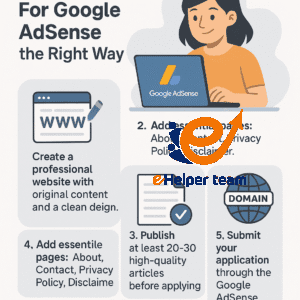
How to Apply for Google AdSense the Right Way
A major reason applicants fail is because they don’t follow the correct application process. Here’s what to do:
Set up a professional website with original content, clean design, and proper structure.
Add essential pages: About, Contact, Privacy Policy, Disclaimer.
Post at least 20–30 quality articles before applying.
Use a custom domain (yourname.com) instead of free subdomains.
Submit your application via Google AdSense dashboard.
Wait patiently for review, which can take from a few days to weeks.
What Google’s Review Team Looks For
When you apply, Google’s team checks:
Content quality: Is it original, useful, and well-written?
Website structure: Is the site professional, mobile-friendly, and easy to navigate?
Policy compliance: Does the site violate any rules?
Traffic sources: Are visitors real or from bots/paid clicks?
Advertiser safety: Is the niche appropriate for brands?
Meeting these requirements increases your approval chances significantly.
Common Mistakes Beginners Make
Many first-time applicants repeat the same errors, leading to rejection:
Applying too soon after launching the website.
Using copied or AI-spun content.
Ignoring important pages (Privacy Policy, Contact).
Overloading the site with ads or affiliate links before approval.
Choosing “risky” niches like gambling or adult.
Avoiding these mistakes can save you weeks of frustration.
Best Practices Before Reapplying After Rejection
If google AdSense rejected your site, here’s a step-by-step plan before reapplying:
Carefully read the rejection email and note the reasons.
Audit your website: check design, content, and technical issues.
Add at least 5–10 fresh, long-form articles.
Increase organic traffic with SEO and consistent posting.
Wait 2–3 weeks before submitting again.
Patience and persistence are key—don’t rush the process.
Alternatives if Google AdSense Keeps Rejecting
Sometimes, even after improvements, approval may take time. While waiting, you can monetize your site through alternatives:
Ezoic – Works well with smaller sites and improves ad revenue.
Media.net – Yahoo & Bing’s ad platform, AdSense’s biggest competitor.
Affiliate marketing – Promote products with affiliate links.
Sponsored posts – Get paid by brands to publish content.
This way, your site still generates income while you prepare for AdSense approval.
The Role of SEO in AdSense Approval
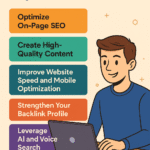
Search Engine Optimization (SEO) doesn’t just help you rank higher in Google search—it also plays a direct role in getting AdSense approval. Google favors websites that attract organic visitors from search engines, as this signals trustworthiness and long-term potential.
Key SEO Practices Before Applying:
Optimize titles and meta descriptions with relevant keywords.
Ensure proper use of H1, H2, and H3 tags.
Improve internal linking between your articles.
Submit your sitemap to Google Search Console.
A well-optimized website demonstrates to AdSense that your content is discoverable and valuable.
How Page Speed Impacts AdSense Approval
A slow-loading website can discourage users and advertisers alike. Google takes website performance seriously because a poor user experience leads to fewer ad impressions and lower engagement.
Tips to Improve Page Speed:
Compress images without losing quality.
Use lazy loading for videos and large graphics.
Minimize CSS and JavaScript files.
Choose a reliable hosting provider.
Fast websites not only help you get approved but also increase your future ad revenue by improving visitor retention.
Building Trust Signals for AdSense Approval
Trust is at the heart of google AdSense rejected approval process. A website that looks suspicious or incomplete will never pass the review stage.
Trust-Building Elements to Add:
Author bios showing expertise.
HTTPS (secure connection).
Clear navigation and user-friendly menus.
A professional logo and consistent branding.
When your site radiates credibility, advertisers feel safe placing their ads there.
The Importance of Niche Selection for Long-Term Success
google AdSense rejected, While some sites get approved, they fail to generate meaningful revenue because they operate in low-value niches. Choosing the right niche from the start can set you up for high CPC (Cost Per Click) earnings.
High-Value Niches Include:
Finance & investment.
Health & wellness.
Technology & software.
Education & online courses.
Picking the right niche means you’ll not only get approved but also maximize your ad revenue potential.
FAQs: Common Questions About Google AdSense Rejected Websites
Q1: Why does Google AdSense reject new websites?
Because they often lack quality content, real traffic, or proper compliance.
Q2: Can I reapply after rejection?
Yes, once you fix the issues listed in the rejection email.
Q3: How long should I wait before reapplying?
2–3 weeks after improvements is ideal.
Q4: Do I need a custom domain for approval?
Yes, it shows professionalism and increases chances of acceptance.
Q5: Does AdSense approve all niches?
No, restricted niches like adult, gambling, and hacking are not allowed.
Q6: Is traffic important for approval?
Yes, organic traffic shows your site is valuable and trustworthy.
Conclusion: Turning Rejection Into Opportunity
Getting the message google AdSense rejected your website can feel discouraging, but it’s also a golden opportunity to improve your site. By addressing content quality, compliance, user experience, and traffic, you set yourself up for success not just with AdSense, but with long-term growth.
Remember, Google wants to partner with websites that offer value to users and safety to advertisers. If you make your site professional, original, and audience-focused, AdSense approval will naturally follow—and with it, the opportunity to monetize your passion.